---
title: [ComfyMaster55] Google Colabでは何を選べばいい?いくらかかる?どれを使う?2025年3月版
description: Google Colabの最適な環境とコストを徹底分析。画像生成AIのための推奨設定と具体的な使用例を紹介します。
image: https://corp.aicu.ai/hubfs/rectangle_large_type_2_b669faea4323f433b1a447d097153c68.png
---
[](https://aicu.ai)
Search toggle
- [AICU](https://aicu.ai/)
AICU
- [Blog \[English\]](https://corp.aicu.ai/en)
- [Blog \[Japanese\]](https://corp.aicu.ai/ja/)
- [note](https://note.com/aicu)
- [medium](https://medium.com/@aicu)
- [Products](https://corp.aicu.ai/ja/products)
Products
- [AICU media](https://note.com/aicu/)
- [X(Twitter)@AICUai](https://twitter.com/AICUai)
- [日本市場向け製品](https://corp.aicu.ai/ja/products)
日本市場向け製品
- [特定商取引法](https://corp.aicu.ai/jp-commercial-transactions-act)
- [AI market dev solutions](https://corp.aicu.ai/products)
- [LINE Chatbot \[LuC4\] 全力肯定彼氏くん](https://corp.aicu.ai/ja/tag/luc4%E5%85%A8%E5%8A%9B%E8%82%AF%E5%AE%9A%E5%BD%BC%E6%B0%8F%E3%81%8F%E3%82%93)
- [AICuty](https://corp.aicu.ai/aicuty)
- [Lecture](https://bit.ly/AICUCEO)
- [AICU Creator Union Membership](https://note.com/aicu/membership/info)
- [Pricing](https://corp.aicu.ai/ja/pricing)
- [AICU Japan](https://aicu.jp/)
- [About Us](https://corp.aicu.ai/about)
About Us
- [Vision](https://corp.aicu.ai/vision)
- [Privacy Policy](https://corp.aicu.ai/ja/privacy)
- [Media Policy](https://corp.aicu.ai/media-policy)
- [PRTIMES](https://prtimes.jp/main/html/searchrlp/company_id/133647)
- [Become a partner](https://j.aicu.ai/Creg)
- [Contact](https://corp.aicu.ai/contact)
[Follow us on Facebook](https://m.me/118997804638852?ref=klE9gy8WjnrE) [Follow us on Twitter](https://www.youtube.com/@AICuty) [Follow us on Instagram](https://twitter.com/AICUai)
[](https://aicu.ai)
- [AICU](https://aicu.ai/)
AICU
- [Blog \[English\]](https://corp.aicu.ai/en)
- [Blog \[Japanese\]](https://corp.aicu.ai/ja/)
- [note](https://note.com/aicu)
- [medium](https://medium.com/@aicu)
- [Products](https://corp.aicu.ai/ja/products)
Products
- [AICU media](https://note.com/aicu/)
- [X(Twitter)@AICUai](https://twitter.com/AICUai)
- [日本市場向け製品](https://corp.aicu.ai/ja/products)
日本市場向け製品
- [特定商取引法](https://corp.aicu.ai/jp-commercial-transactions-act)
- [AI market dev solutions](https://corp.aicu.ai/products)
- [LINE Chatbot \[LuC4\] 全力肯定彼氏くん](https://corp.aicu.ai/ja/tag/luc4%E5%85%A8%E5%8A%9B%E8%82%AF%E5%AE%9A%E5%BD%BC%E6%B0%8F%E3%81%8F%E3%82%93)
- [AICuty](https://corp.aicu.ai/aicuty)
- [Lecture](https://bit.ly/AICUCEO)
- [AICU Creator Union Membership](https://note.com/aicu/membership/info)
- [Pricing](https://corp.aicu.ai/ja/pricing)
- [AICU Japan](https://aicu.jp/)
- [About Us](https://corp.aicu.ai/about)
About Us
- [Vision](https://corp.aicu.ai/vision)
- [Privacy Policy](https://corp.aicu.ai/ja/privacy)
- [Media Policy](https://corp.aicu.ai/media-policy)
- [PRTIMES](https://prtimes.jp/main/html/searchrlp/company_id/133647)
- [Become a partner](https://j.aicu.ai/Creg)
- [Contact](https://corp.aicu.ai/contact)
Search toggle
[](https://aicu.ai)
- [AICU](https://aicu.ai/)
AICU
- [Blog \[English\]](https://corp.aicu.ai/en)
- [Blog \[Japanese\]](https://corp.aicu.ai/ja/)
- [note](https://note.com/aicu)
- [medium](https://medium.com/@aicu)
- [Products](https://corp.aicu.ai/ja/products)
Products
- [AICU media](https://note.com/aicu/)
- [X(Twitter)@AICUai](https://twitter.com/AICUai)
- [日本市場向け製品](https://corp.aicu.ai/ja/products)
日本市場向け製品
- [特定商取引法](https://corp.aicu.ai/jp-commercial-transactions-act)
- [AI market dev solutions](https://corp.aicu.ai/products)
- [LINE Chatbot \[LuC4\] 全力肯定彼氏くん](https://corp.aicu.ai/ja/tag/luc4%E5%85%A8%E5%8A%9B%E8%82%AF%E5%AE%9A%E5%BD%BC%E6%B0%8F%E3%81%8F%E3%82%93)
- [AICuty](https://corp.aicu.ai/aicuty)
- [Lecture](https://bit.ly/AICUCEO)
- [AICU Creator Union Membership](https://note.com/aicu/membership/info)
- [Pricing](https://corp.aicu.ai/ja/pricing)
- [AICU Japan](https://aicu.jp/)
- [About Us](https://corp.aicu.ai/about)
About Us
- [Vision](https://corp.aicu.ai/vision)
- [Privacy Policy](https://corp.aicu.ai/ja/privacy)
- [Media Policy](https://corp.aicu.ai/media-policy)
- [PRTIMES](https://prtimes.jp/main/html/searchrlp/company_id/133647)
- [Become a partner](https://j.aicu.ai/Creg)
- [Contact](https://corp.aicu.ai/contact)
[Follow us on Facebook](https://m.me/118997804638852?ref=klE9gy8WjnrE) [Follow us on Twitter](https://www.youtube.com/@AICuty) [Follow us on Instagram](https://twitter.com/AICUai)
Search toggle
What are you looking for?
Search
# \[ComfyMaster55\] Google Colabでは何を選べばいい?いくらかかる?どれを使う?2025年3月版
2025/3月/1
 [AICU Japan](https://corp.aicu.ai/ja/author/aidx-lab)
![\[ComfyMaster55\] Google Colabでは何を選べばいい?いくらかかる?どれを使う?2025年3月版](https://corp.aicu.ai/hubfs/rectangle_large_type_2_b669faea4323f433b1a447d097153c68.png)
動画生成「Wan2.1」のリリースにより、動画生成を自分自身のワークフローで動作させることも現実的になってきました。
[https://note.com/aicu/n/n661bd6e7bebb](https://note.com/aicu/n/n661bd6e7bebb)
この記事では来たるべき動画生成AI時代に向けて、基本に立ち返り、最先端のComfyUIを使うことで、必要となる演算環境とコストについて分析してみました。
## そもそもGoogle Colabは何を選べばいいの?
これまでAICUでは様々なケースでGoogle Colabを紹介してきました。
[https://note.com/aicu/n/ndceebdc12ff4](https://note.com/aicu/n/ndceebdc12ff4)
動画生成が自分のホストできる時代がやってきたとして、どのようなプランを契約し、どのランタイムを選べばよいのでしょうか?
最近更新されたGoogle Colabのラインナップとコストを調査してみました。
## VRAM最強はA100、メモリ最強は…?
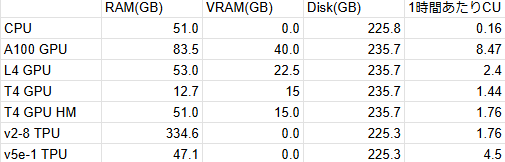
こちらが2025年2月末時点でのGoogle Colab Proで利用できる環境の一覧です。
[](https://assets.st-note.com/img/1740672079-OrM8XvqfHnPiF9ylwTgI67sz.png?width=2000&height=2000&fit=bounds&quality=85)
**RAM(GB) VRAM(GB) Disk(GB) 1時間あたりCU消費
CPU** 51.0 0.0 225.8 0.16
**A100** **GPU** 83.5 40.0 235.7 8.47
**L4 GPU** 53.0 22.5 235.7 2.4
**T4 GPU** 12.7 15 235.7 1.44
**T4 GPU** HM 51.0 15.0 235.7 1.76
**v2-8 TPU** 334.6 0.0 225.3 1.76
**v5e-1 TPU** 47.1 0.0 225.3 4.5
Google Colabでいちばんお安く利用できるGPU搭載環境はT4 GPUです。
画像生成AIを使用するなら、まずT4GPU(通常メモリ)で実験してみましょう(GPUがないと、とても時間がかかります!)。
また「T4 ハイメモリ」はメインメモリ、つまりRAMが51GBになるだけでVRAMは増えません。一方でメインメモリが欲しいだけであれば、v2-8 TPUが334.6GBも利用できます。
画像生成AIやLLMはオンボードのオンメモリにダウロードしたcheckpointが「乗り切った状態」が最も高速です。つまり6GBほどの重み(wights, checkpointファイル) が乗り切るには最低でも6GBほしい、ということになります。複数のcheckpointを使わなければならないときやノートPCのように最大VRAMが小さい場合は、メインメモリに分散して利用することになります(自動で処理されます)。
VRAMが使えるGPUの中ではA100の40GBが最強です。
料金は、1時間あたり8.47CUを消費します。
Google Colabの料金はComputing Unit (CU)で表現され、動的に変わります。
料金的には100CUで1179円なので、1時間あたり99.9円。T4の5-6倍の値段です。ただし、インストールをしたりダウンロードをしている時間もCUを消費しますので、まずは実験をするのであればL4の20GBや、T4の15GBを使って試してみるのががよいでしょう。
## 実際のVRAM消費、コストと体感速度。
ではGoogle Colab Proで様々な環境を使って、実験をしてみます。
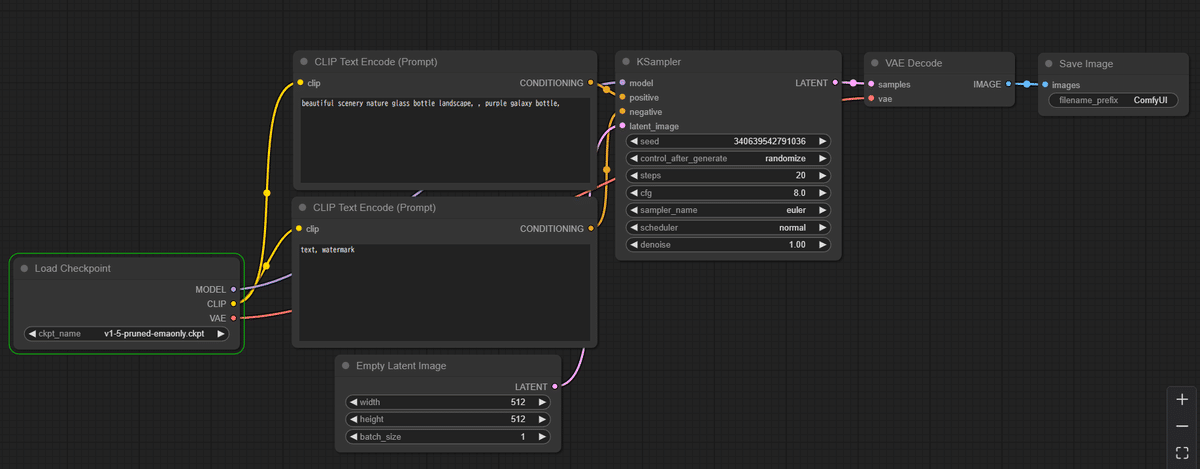
ComfyUIにStable Diffusion 1.5をロードして、画像を生成する基本のワークフローです。
[https://note.com/api/v2/attachments/download/9b2637ac12f13fe7b953e8668a9d711b](https://note.com/api/v2/attachments/download/9b2637ac12f13fe7b953e8668a9d711b)
[](https://assets.st-note.com/img/1740756776-w3BFCDPn5ap7UcoeLiMXEh4Y.png?width=2000&height=2000&fit=bounds&quality=85)
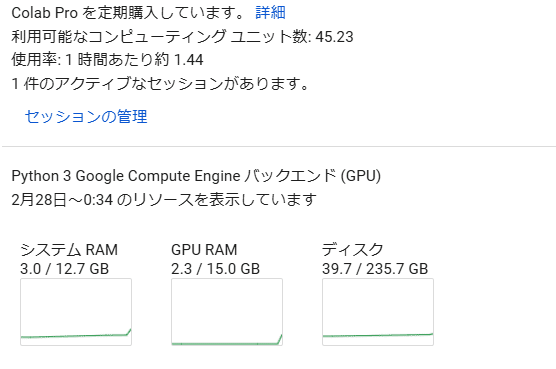
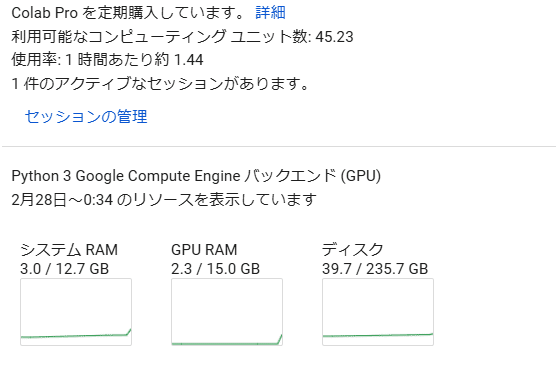
まずは一番安価なT4 GPUを使ってみます。
コストは1.44CU、1時間あたり17円、24時間で407円です。仮に1ヶ月使い続けたとして12,223円です。
[](https://assets.st-note.com/img/1740756959-ZGBnyI4zNm8ktqVOr6K3UlJ9.png?width=2000&height=2000&fit=bounds&quality=85)
[](https://assets.st-note.com/img/1740756860-dxkq9WCQvsyrJUBtaeoMHADF.png?width=2000&height=2000&fit=bounds&quality=85)
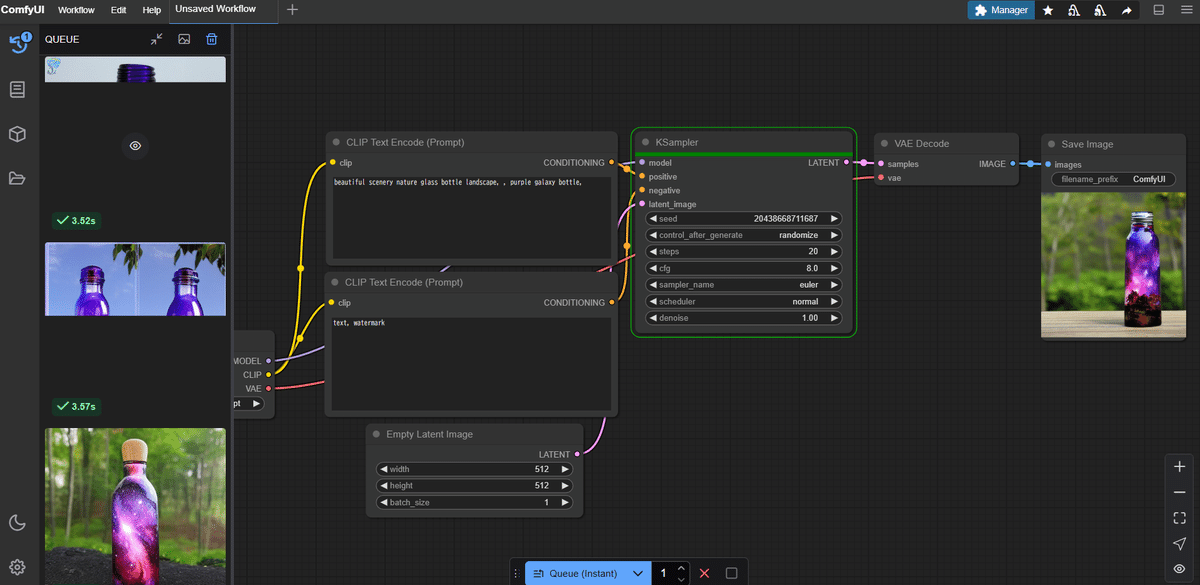
連続画像生成をさせてみます。
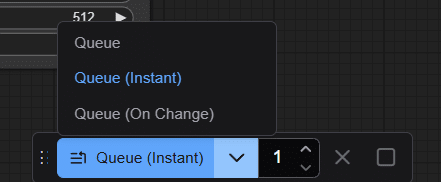
Queueボタンは通常は「1枚生成」ですが「🔻」を押して「Queue (Instant)」を選んで生成すると連続生成になります。
[](https://assets.st-note.com/img/1740757232-PygCKmwE5G4bQJAY1n87ULMW.png?width=2000&height=2000&fit=bounds&quality=85)
[](https://assets.st-note.com/img/1740757191-OklrxobZaTInf5z1d4F76gE2.png?width=2000&height=2000&fit=bounds&quality=85)
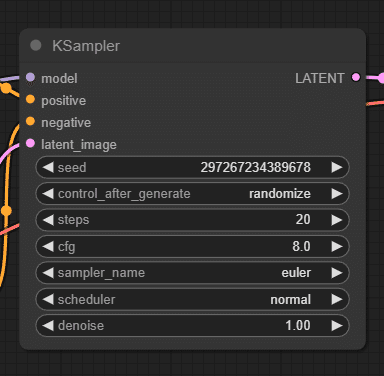
デフォルトの20ステップ、euler、512x512のLatent Imageであれば1画像生成あたり3.7秒ぐらいです。
[](https://assets.st-note.com/img/1740757303-tAlejnJUHoIgKWO6dyPzYfD5.png?width=2000&height=2000&fit=bounds&quality=85)
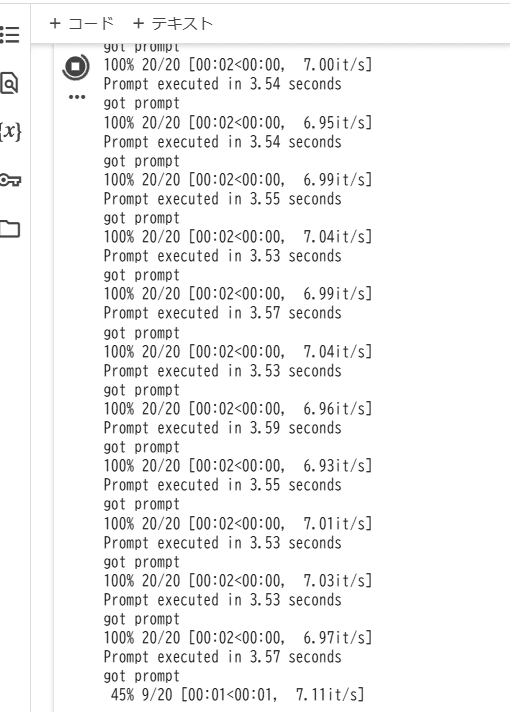
1秒あたり7イテレーション、20ステップなので3秒ぐらい、という計算になります。
[](https://assets.st-note.com/img/1740757380-mOFJxKPqoMXC0f8vbD2kdtwH.png?width=2000&height=2000&fit=bounds&quality=85)
Google Colab側の実行ログ
### Google Colab L4 GPUでの体感速度
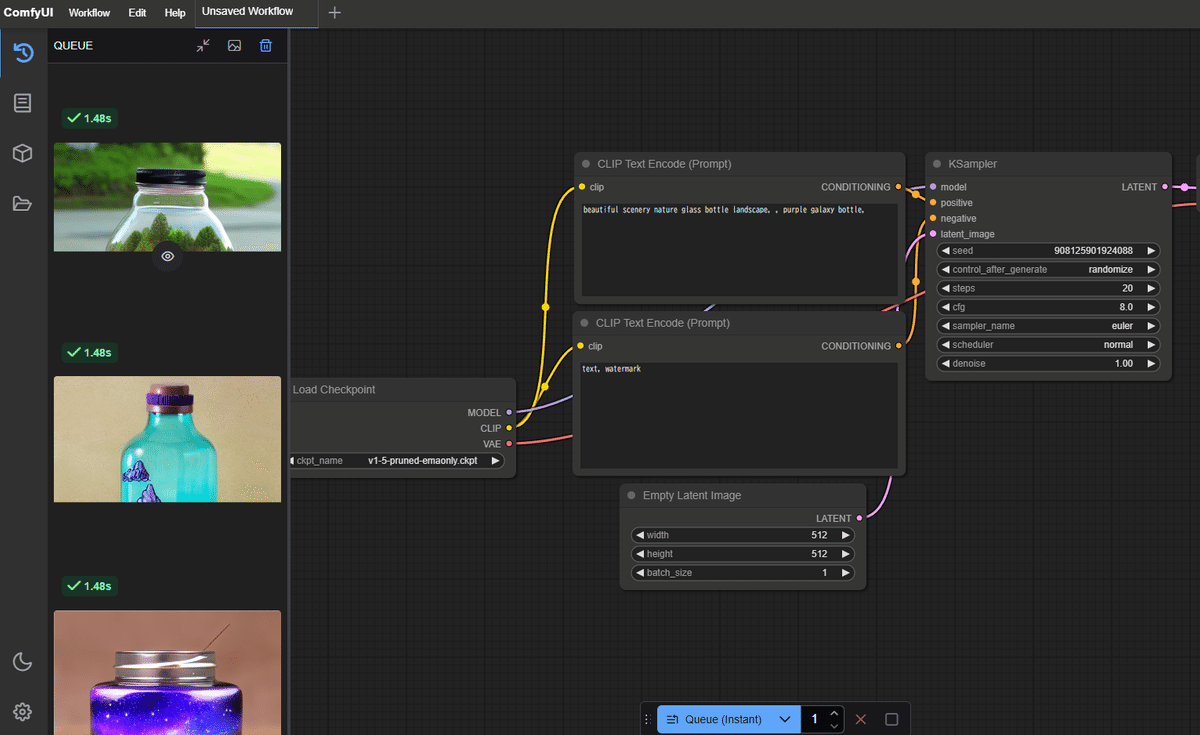
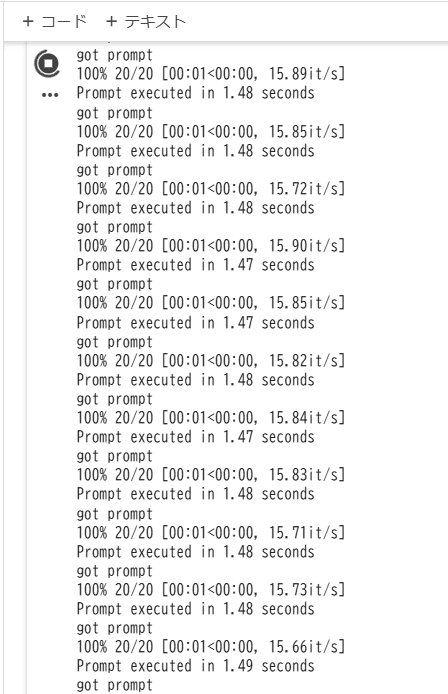
同じスクリプトを T4ではなく L4 GPUに変更して実行してみます。
コストは1.44CU→2.4CU、1時間あたり17円→28円、24時間で407円→679円です。仮に1ヶ月30日使い続けたとして12,223円→20,373円です。
先述のデフォルトワークフロー、SD1.5での画像生成は以下のとおりです。
1.47秒/生成、15.89イテレーション/秒。ちょうどT4はL4の倍ぐらいの性能があるということになります。
[](https://assets.st-note.com/img/1740762544-ewcTJMQI6DlrNdqjsz0W781t.png?width=2000&height=2000&fit=bounds&quality=85)
[](https://assets.st-note.com/img/1740762515-Mrc2fXP4NOiwEsjoZ60dSCxQ.png?width=2000&height=2000&fit=bounds&quality=85)
## Animagine XL 4 Optを使った実験
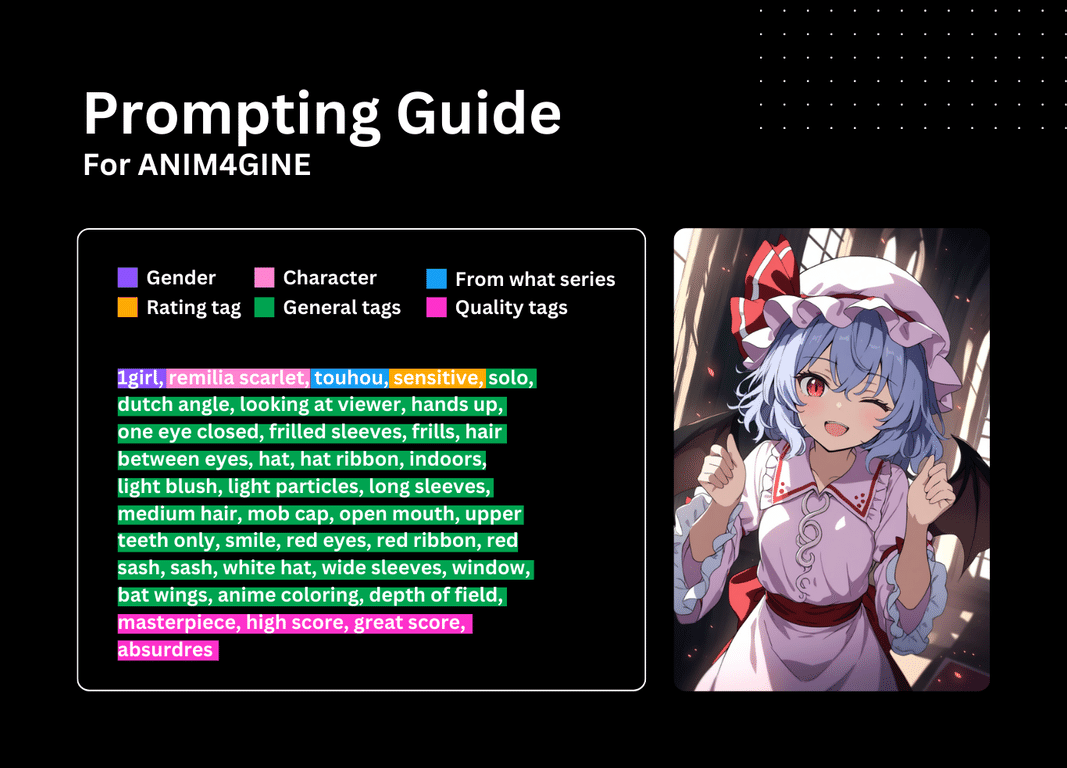
さて、より実用的な画像生成として「Animagine XL 4 Opt」を使ってみましょう。
公式の設定やプロンプトガイドに従ってプロンプトを構築するの忘れずに。
[](https://assets.st-note.com/img/1740758614-NaHnP7BksrvbUgCmef1qIE9Q.png?width=2000&height=2000&fit=bounds&quality=85)
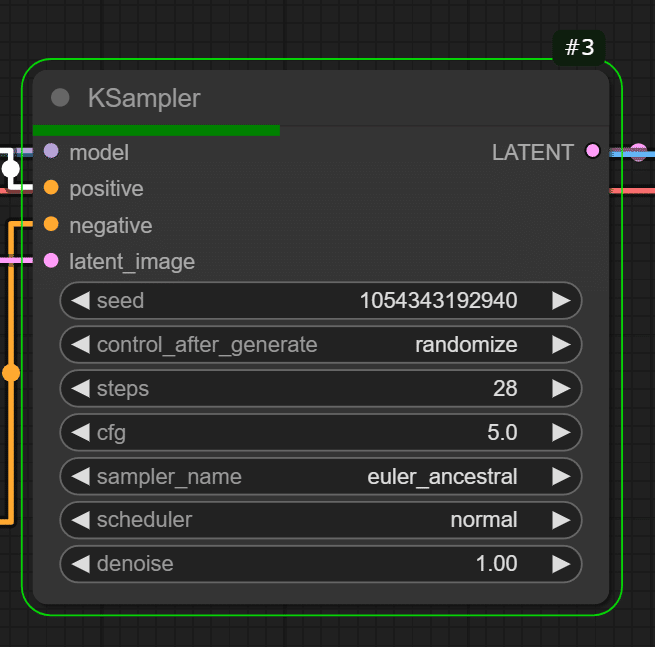
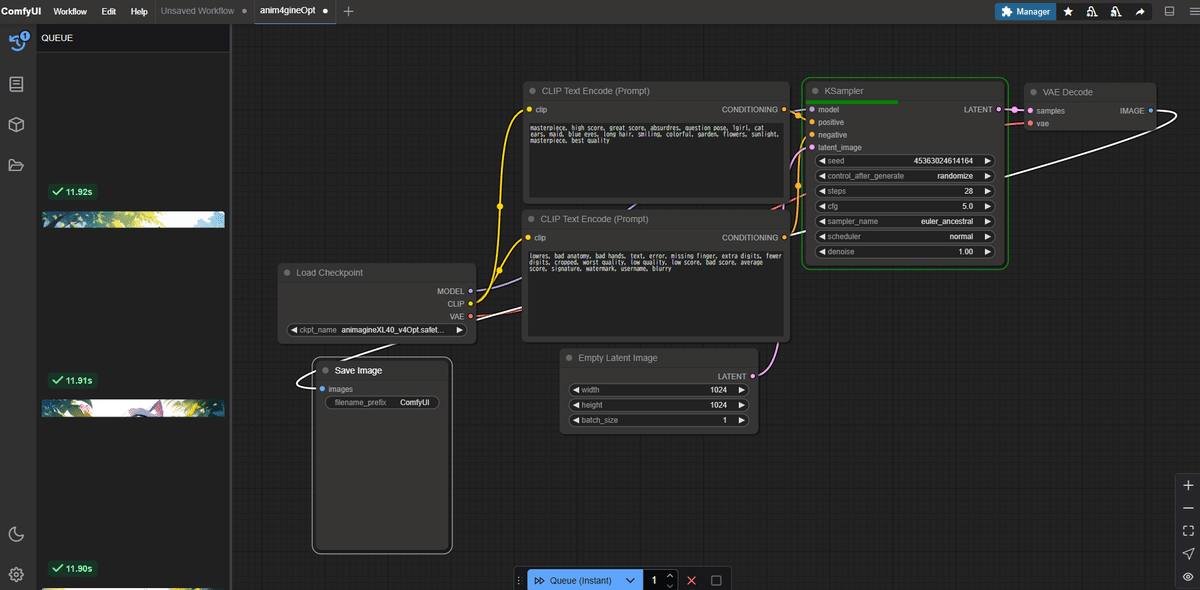
ステップを28、CFGを5.0、サンプラーを「euler\_ancestral」にします。
[](https://assets.st-note.com/img/1740759092-HNdVhMB4ZLOxpeIRJm5ogu1f.png?width=2000&height=2000&fit=bounds&quality=85)
[https://note.com/aicu/n/n34cbd0ea427e](https://note.com/aicu/n/n34cbd0ea427e)
生成画像は素晴らしいです…!
[](https://assets.st-note.com/img/1740759276-Ysvf8x3AF9J1d5Cz4urIwbES.png?width=2000&height=2000&fit=bounds&quality=85)
### Animagine XL 4 Opt - Google Colab L4 GPU での 速度は?
11.9sec、2.51it/sという結果でした。
[](https://assets.st-note.com/img/1740763545-8MrPRDgU4eCG9z7VBIiFO2Nc.png?width=2000&height=2000&fit=bounds&quality=85)
Google Colab環境は、Googleのクラウドをトンネリングをして利用しているためか、画像の転送のほうが重たい印象があります。ダウンロード自体は高速ですが、(ドライブに保存されたモデルを使わずに)毎回、クリーンインストールする場合は必要なモデルをダウンロードしていると結構な時間がかかってしまいます。一方で生成した画像をGoogle Driveに直接保存できるといった利点もあります。時間限定とはいえ、使いやすいPythonノートブック環境と非常に安価にGPU演算環境を占有できる点が魅力です。
---
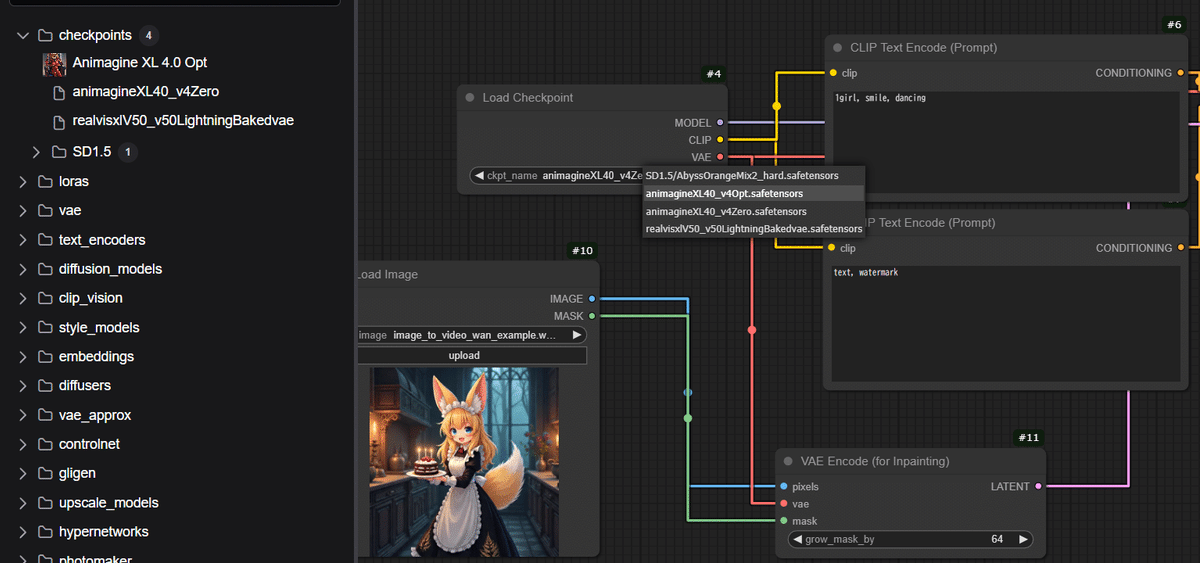
もちろん、あまり難しいことを考えずにすぐ試してみたい!という場合はAICU(アイキュー)が運営する「共有ComfyUI」もオススメです。
[https://note.com/aicu/n/n731885b80a3c](https://note.com/aicu/n/n731885b80a3c)
モデルのインストールも一時的に開放しています。Animagine XL 4の更新版「Animagine XL 4.0 Opt」と「Animagine XL 4.0 Zero」も利用できます。
[](https://assets.st-note.com/img/1740762822-5lSDo6Y1QE8HkxMWcUyG2VAa.png?width=2000&height=2000&fit=bounds&quality=85)
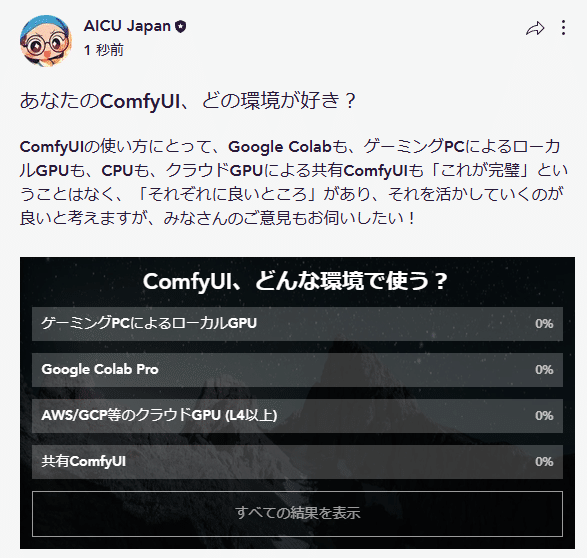
ComfyUIの使い方にとって、Google Colabも、ゲーミングPCによるローカルGPUも、CPUも、クラウドGPUによる共有ComfyUIも「これが完璧」ということはなく、「それぞれに良いところ」があり、それを活かしていくのが良いと考えます。
AICUはオープンソースでの画像生成AIに長く参加してきたので、その本質を理解しています。多様なケースの利点について、皆さんの知見がありましたら、[AICU.jpのコミュニティ](https://www.aicu.jp/x/free/discussion/d02d1561-b611-4234-9e78-9b53c3dbb582)でお聞かせいただければ幸いです。
[https://www.aicu.jp/x/free/discussion/d02d1561-b611-4234-9e78-9b53c3dbb582](https://www.aicu.jp/x/free/discussion/d02d1561-b611-4234-9e78-9b53c3dbb582)
[](https://assets.st-note.com/img/1740755999-R9rBsD6eKXNWtQPfFjcUpibS.png?width=2000&height=2000&fit=bounds&quality=85)
[https://www.aicu.jp/x/free/discussion/d02d1561-b611-4234-9e78-9b53c3dbb582](https://www.aicu.jp/x/free/discussion/d02d1561-b611-4234-9e78-9b53c3dbb582)
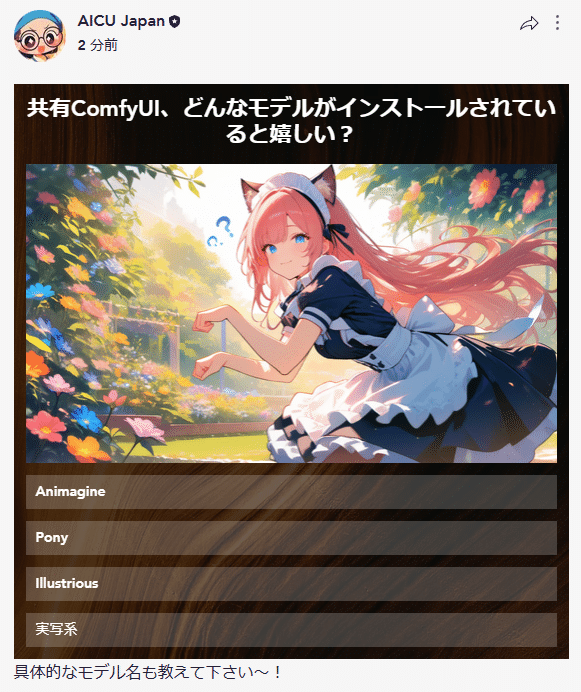
モデルのインストールもご意見募集中です。
[](https://assets.st-note.com/img/1740760672-DcQOA3svjdIKyMVCYkoXFq76.png?width=2000&height=2000&fit=bounds&quality=85)
[https://www.aicu.jp/x/free/discussion/f8bd25e0-8f00-4fb0-b0ad-388d83a53d7e](https://www.aicu.jp/x/free/discussion/f8bd25e0-8f00-4fb0-b0ad-388d83a53d7e)
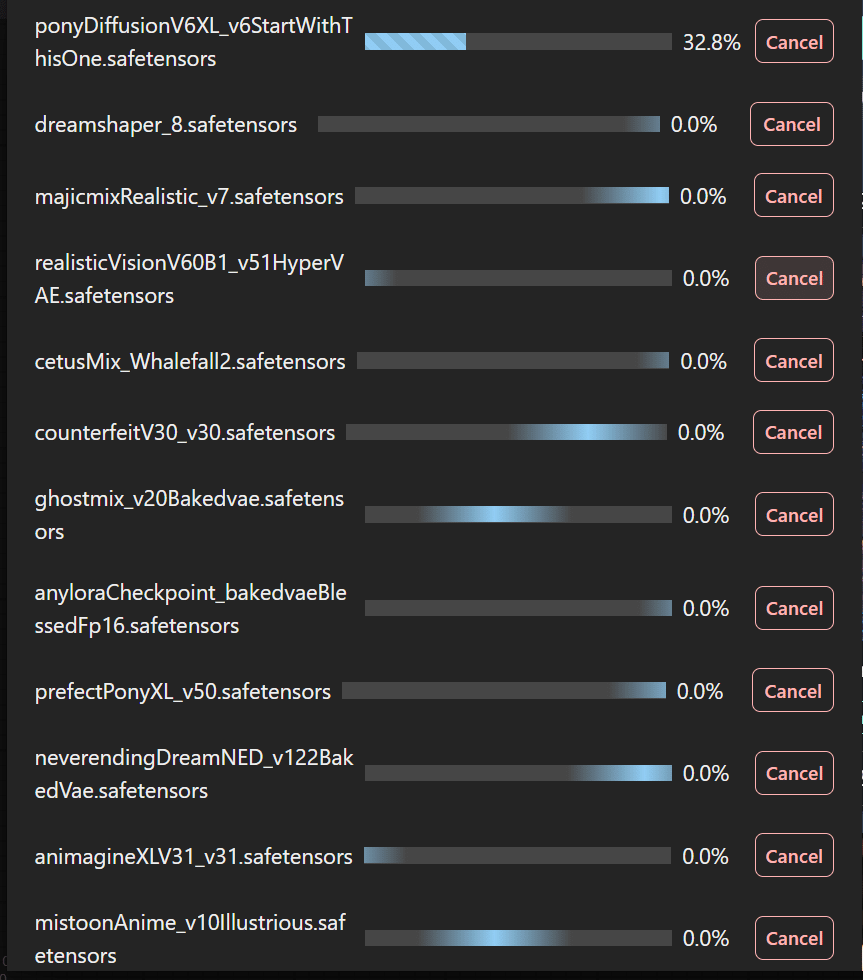
どんどん成長するサービスになっています!
[](https://assets.st-note.com/img/1740762204-CU4FP9rmiWNqe0Gs6L8lagyc.png?width=2000&height=2000&fit=bounds&quality=85)
近日発売予定の書籍の中にもそのような知見を共有していきたいですね。
みなさまのComfyUIの知見をお寄せください!
[https://note.com/aicu/n/nf5e8343921f3](https://note.com/aicu/n/nf5e8343921f3)
Originally published at [https://note.com](https://note.com/aicu/n/n6c297874e343) on Feb 28, 2025.
### Share:
[Share on Facebook](http://www.facebook.com/share.php?u=https://corp.aicu.ai/ja/comfymaster55-google-colab-20250228&utm_medium=social&utm_source=facebook) [Share on LinkedIn](http://www.linkedin.com/shareArticle?mini=true&url=https://corp.aicu.ai/ja/comfymaster55-google-colab-20250228&utm_medium=social&utm_source=linkedin) [Share on X](https://twitter.com/intent/tweet?original_referer=https://corp.aicu.ai/ja/comfymaster55-google-colab-20250228&utm_medium=social&utm_source=twitter&url=https://corp.aicu.ai/ja/comfymaster55-google-colab-20250228&utm_medium=social&utm_source=twitter&source=tweetbutton&text=[ComfyMaster55]%20Google%20Colabでは何を選べばいい?いくらかかる?どれを使う?2025年3月版)
[Google Colab](https://corp.aicu.ai/ja/tag/google-colab), [ComfyUI](https://corp.aicu.ai/ja/tag/comfyui), [VRAM](https://corp.aicu.ai/ja/tag/vram)
## AICU Japan
AICU Inc. AIDX Lab - Koto
[info@aicu.ai](mailto:info@aicu.ai)
## Comments
## Related posts
Search [ComfyUIが最新動画生成モデル「Wan2.1」にネイティブ対応!デスクトップアプリも大幅更新](https://corp.aicu.ai/ja/comfyui-20250227?hsLang=ja)
[世界のクリエイティブAI最前線:Project Odysseyシーズン2に見る多様性と課題](https://corp.aicu.ai/ja/project-odyssey-2-20250301?hsLang=ja) Search

AICU Inc. is AIDX company.
[Follow us on Facebook](https://m.me/118997804638852?ref=klE9gy8WjnrE) [Follow us on Twitter](https://twitter.com/AICUai) [Follow us on Instagram](https://www.youtube.com/@AICuty)
Main Office: 830 STWART DR STE277 SUNNYVALE, CA 94085-4513
```json
{
"@context" : "https://schema.org",
"@type" : "BlogPosting",
"author" : {
"@type" : "Person",
"name" : "AICU Japan",
"url" : "https://corp.aicu.ai/ja/author/aidx-lab"
},
"dateModified" : "2025-03-01T19:30:42.274Z",
"datePublished" : "2025-03-01T19:30:42.000Z",
"headline" : "[ComfyMaster55] Google Colabでは何を選べばいい?いくらかかる?どれを使う?2025年3月版",
"image" : [ "https://corp.aicu.ai/hubfs/rectangle_large_type_2_b669faea4323f433b1a447d097153c68.png" ],
"mainEntityOfPage" : {
"@id" : "https://corp.aicu.ai/ja/comfymaster55-google-colab-20250228",
"@type" : "WebPage"
},
"publisher" : {
"@type" : "Organization",
"logo" : {
"@type" : "ImageObject",
"url" : "https://corp.aicu.ai/hubfs/android-chrome-512x512.png"
},
"name" : "AICU Inc."
}
}
```